Skyguider Pro and Autoguiding

One of the challenges with my astrophotography set up is that its not portable. To be able to take photographs of Deep Sky Objects, I needed a set up that allows for autoguiding while still being portable enough to carry on airplanes. After a little bit of research back in 2022, I found a couple of mounts that I thought would meet my needs. Both were portable tracking mounts (tracking in RA only no DEC motor) that had capability to do autoguiding through ST4 port of the camera. Of the two (Skywatcher star adventurer and iOptron Skyguider Pro), I decided to go with iOptron mount as I had recently purchased another mount of theirs (GEM45) and was pretty satisfied with it. Ofcourse, only a month after I bought the tracking mount Sky Watcher comes out with a portable Star Adventurer GTi which has tracking both in RA and DEC making for better tracking, GoTo capability and pulse guiding through PHD. The mount was announced but was not available to be delivered until a couple of months if I recall correctly. I decided to hold on to the Skyguider Pro and make a decision at a later point if I want to trade-in the Skyguder Pro with Star Adventurer GTi. Only problem is, I never did. We were expecting out second baby so this mount was going to be used when we actually planned to make a trip which was not in the near future. The mount sat in the storage and I just sat on making the trading in decision. Now its too late to get a decent value from a brand new unused mount that is couple of years old when there are much better similar priced optinos in the market available. So I decided I will just use it and not focus on upgrading.

This past month I decided to test out the mount’s autoguiding capability now that my daughter is a year old we have been seriously thinking of starting travel (including camping). I thought testing should be quick and easy but boy was I wrong! We have had a good run of clear night skies in PNW so I set up the mount one night, polar aligned and then tried it with my camera and 70-300mm lens. I hoooked up the autoguider camera (ZWO ASI 120MMS) and guidescope (ZWO 30 f/4) and tried to autoguide with PHD2 with “on camera” as the mount option in the PHD2 setup. During calibration, PHD2 failed saying that there was little to no movement to the east. I tried looking at the cables, connections etc. to make sure if everything was connected right and there were no loose cables. Nope. Everything was connected fine. After fiddling with the equipment for an hour, I decided to give up. Assuming it might have been a faulty cable, I tried to set up the following night again but with different sets of cables. I switched to a ZWO ST4 cable and a different USB from camera to the laptop but no joy. After the second frustrating night, I decided to trouble shoot during the day time and not waste any of the clear nights trying to debug the issue. I used my regular telescope setup to actually gather photons from Deep Sky Objects for the next couple of nights.

To debug, I tried manual guiding by pointing the guide camera to a tiny stationary object during day time but the mount did not budge. With no other ideas on what could be wrong outside of either the wire or the ST4 port on the autogider or mount being broken, I reached out to iOptron for help. After a couple of back and forth emails, I learnt that it could be the ports are wired differently for the camera and the mount. When I looked up the pinouts for the camera and the mount, it was indeed different, although only the RA (left and right) pins were flipped. See below:

Skyguider Pro Guide Port Pinout: Source: https://www.ioptron.com/v/Manuals/3550_SkyGuiderPro_Manual.pdf
Camera Guider Port: Source: https://i.zwoastro.com/zwo-website/manuals/ZWO_ASI_Cameras_Software_Manual_EN(Windows).pdf

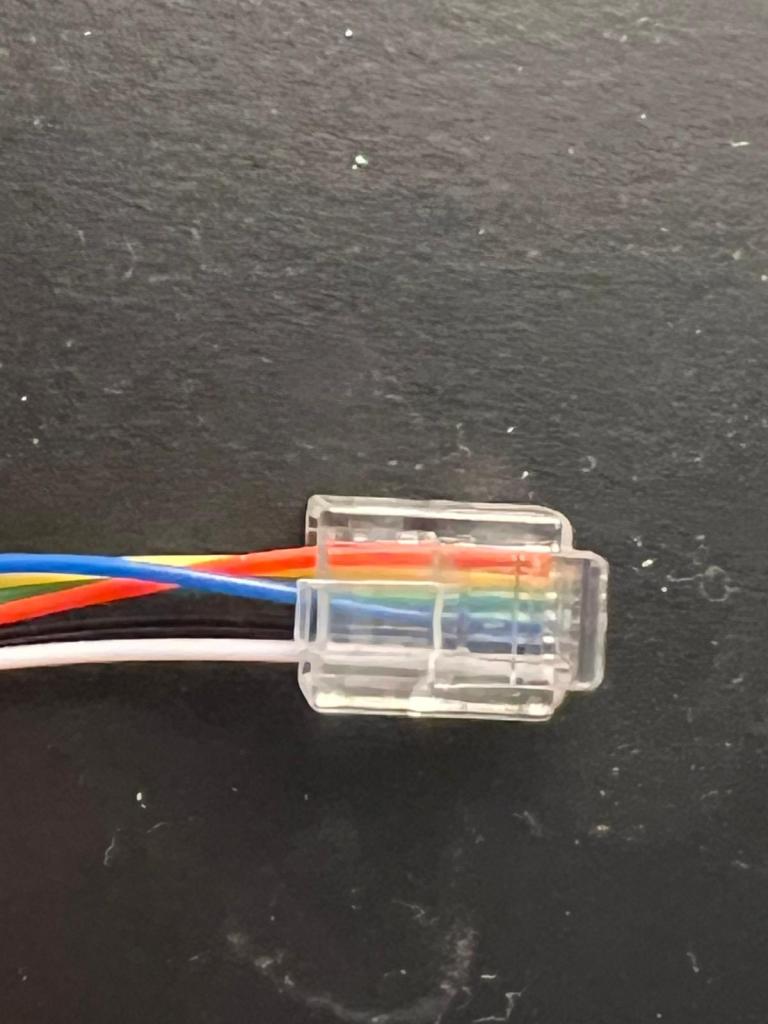
To test if this was the issue, I stripped the RJ11/12 wire flipped the 3rd and 6th and crimped a new RJ11/12 socket. I tested it out using the manual guiding method during the day time and was excited to see the mount move. At night, after the kids went to bed, I set up the mount again and launched autoguiding through PHD2. Calibration succeeded on first try and the mount was being autoguided by the camera. To see if I could get long exposures, I tried several 5 minute subs at 300mm and saw no star trails at all. Exciting times!. I now need to try the 600mm lens and test 5 minute exposures but for all practical purposes my “travel” set up is now ready to go. All we need to do is make some trips to places with lower light pollution to actually use my travel set up to get some DSOs.

Here is the image of the DIY ST4 cable:
Astronomy: End of an era

Early last month, I bid goodbye to my trusty old mount. I had bought that mount about 12 years ago without knowing much about astronomy or astrophotography. All I had was a keen interest and after reading some reviews on Amazon, I went ahead and purchased an Orion 8″ Newtonian and a SkyView Pro (SVP) mount. I For the first 10 years, I used the mount and telescope sparingly for various reasons. As I mentioned in my earlier blogs, starting last year, I have been spending much more time on astrophotography. With a new lighter telescope, I was able to use the existing mount and get pretty good autoguiding for long exposure photography. I had experimented with 10 minute exposures and got pretty nice round stars. I was pretty happy with the combination and would use to look forward to clear nights for setting up my telescope to take pictures. I have dealt with several challenges in my astrophotography journey which I have been documenting in my blog. Those challenges ranged from light pollution to plate solving to focus but hardly ever on auto guiding. All this changed a couple of months ago. No matter how accurate my polar alignment or the balance of my mount, I was not successful in getting autoguiding to work. In fact, over my last few outings, I wasn’t even able to suffcessfuly calibrate the mount to begin autoguiding. In addition, I had noticed that mount wasn’t moving freely when the RA and Dec bolts were disengaged. I did what I usually do.. trusty ole Google 🙂 . After a bit of research I found a couple of posts talking about degreasing the mount for cases where the mount doesn’t move as freely when the RA/DEC locks are disengaged. This usually seeemed to solve the problem for cases when case calibration fails even with accurate polar alignment and well balanced mount.

Given my mount was more than a decade old and was having trouble moving frictionlessly, I decided to put my shoddy DIY skills to use and degrease/regrease the mount. I looked up but did not find any videos on the process of doing that for my specific mount. I’m not someone who backs away from a challenge so I decided I will go ahead without instructions (in reality, my mount was End of Life anyway, so I did not see a huge risk to opening up the mount). I tried to document my journey through a video but not sure how much I captured given that I was so engrossed in oepening up my mount that I did not pay attention to how much was actually captured (and if it was captured well). I tried. I will post my learnings in a new blog post with a YouTube video in case it might help someone. Too lazy to do all the editing needed to get it out there. Anyway, I was able to open up the mount alright – Although there is a big warning for any DIY’ers planning to open up their SVP mount! I almost broke my mount trying to open it up. Orion did some sneaky stuff with the number of screws in RA vs. DEC axes. More on it in the video but suffice to say I almost ruined my mount. Well, the mount was ruined for other reasons that will bcome apparent momentarily but if not for that, i would have ruined a nice mount because of the snafu I made.

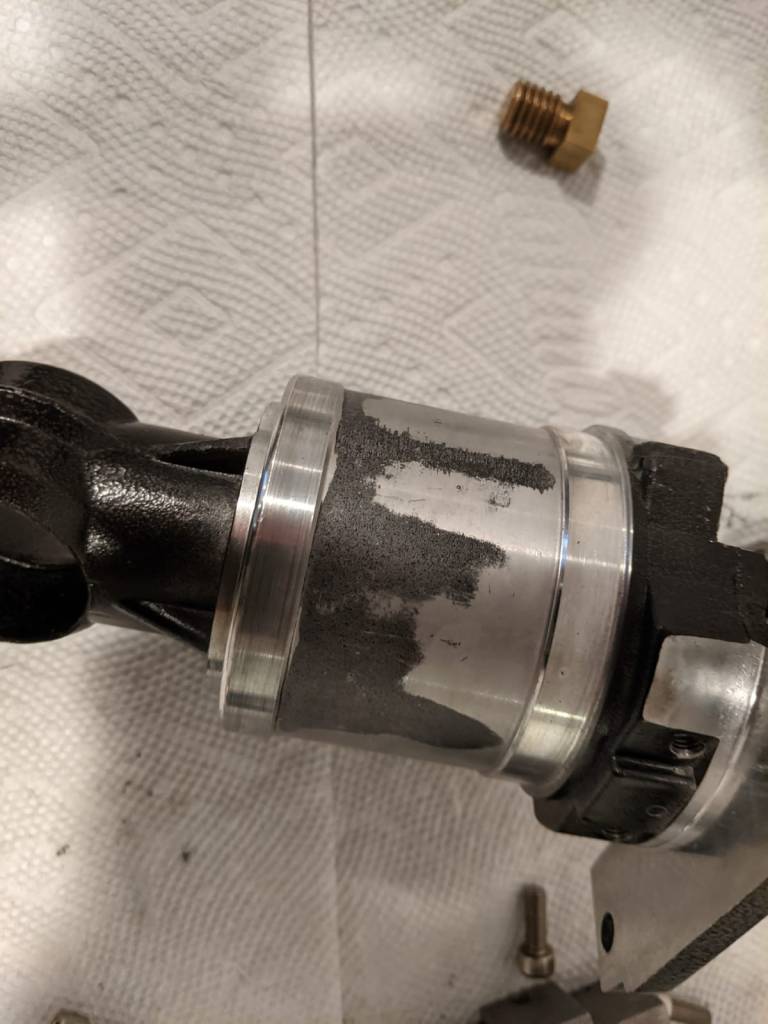
Anyway, the reason I called this blog post end of an era is this:

Major reason why autoguiding on SkyViewPro mount was failing

My trusty old mount had significant abrasions which were causing the friction in the mount preventing it from moving freely! That’s 12 years of wear and tear right there. My handling of the mount was very rough and it had fallen off my hands once. I still had some hope and put a bunch of grease and put the mount together. I tried taking it out on a clear night. I seemed to be tracking well but calibration was failing over and over again 😦 . At that point, I decided that it was time for me to retire this mount (although, I think I can still use it for wide angle unguided photography), and invest in a new one for Deep Sky Imaging. What surprised me was that I was able to take unguided 180 second images which showed very little to no signs of trailing.This is an eight 180 second image stack of fish head nebula (with some basic stretching):

Fish Head Nebula no autoguiding 180 sec*8 images stacked and stretched

Anyway, 180 second is no good if I want to image faint objects with filters applied. More on that in a later post but I did make a decision and invest in filter as opposed to going monochrome with filterwheel etc. It made more sense in light of the investment (well I call it an investment to justify it but its just an expense 🙂 ) I made for a new mount. More on that in another post as well. Hoping to spending more time updating the blog but not many hours in the day to do it… hopefully soon. Until then adios!

Astronomy: When cheap LPF solutions aren’t enough

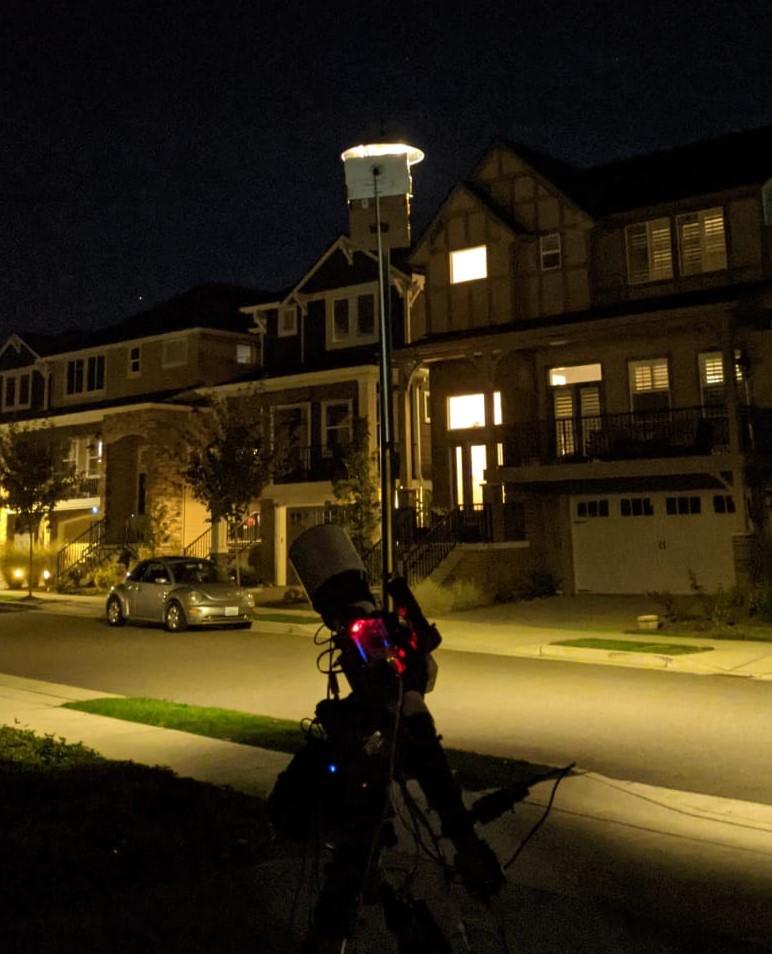
For a little over a year I have been doing astrophotography from my drive way, I have talked about how there is a lamp post right in front of my house creating challenges in photographing North Eastern Sky. I have, over time, employed crude techniques to limit the light intrusion from that lamp post including a crude cardboard placed on the OTA. Last night I was trying to image the fishhead nebula (IC 1795). It is visible on the north eastern part of the sky and I have been avoiding objects on that side because of the aformentioned reason. However, last night I had a plan! Well, what I thought was a fool proof plan. To block out the light pollution from the lamp post, here is what I did:

A relatively inexpensive solution that actually did a pretty goood job blocking the light from the lamp post. It’s a bit short and doesn’t cover the entire lamp but that I can fix for next time around. It has now become a part of my setup! However, the night was still mostly a bust for two reasons:

  1. Full Moon
  2. Autoguiding

I had accounted for the fact that it was a full moon night and hence deliberately chose a target (away from moon) but the second issue forced me to choose another target. Given that the nebula is faint, I wanted to capture as much data as possible which meant atleast 180 sec, if not 300 sec light frames. Unfortunately, autoguiding was failing due to mount backlash issues. From my prior googling, I know that the mount needs to be balanced and not over capacity. I ensured that th mount was balanced before I started. I need to try next time with one less counter weight placed at the end to see if two counter weights are taking mount over capacity. Anyway, because of spectacular failure in autoguiding, I had to resort to unguided images which meant easier targets. I slewed to triangulum galaxy as I thought it would be okay to get 100 sec or less unguided exposures. While I did achieve good round stars and no star trailing (surprised as autoguiding was failing but this worked 😐 ), there was a glow from the moon that washed up the images. I could not go longer exposures for the fear of getting even more glow from the moon. Unfortunately, that meant no salvagable data from the night and a key learning – there is more astrophotography related spending in my near future 🙂 .

I need to decide what the next steps are. First, I think i need to try out another night to see if guiding issues still persist. If so, it might be time to retire the mount. It’s been with me since 2012 and has fallen from my hand more than once. More on my thoughts on that later. Second, I need to decide between continuing with OSC (one shot color) photography from my driveway, knowing that the lamp post light pollution is potentially solved but moonlight is not, or go with RGB with a monochrome camera. The advantage of OSC is that I get the entire color spectrum data at once. Given that I have limited window each night to work with, I can try to wrap up a target in a couple of nights. However, OSC also means I am limited to nights when the moon isn’t a problem or I have to invest in a LP filter or a nebula boost filter that can block moon light as well. Its a couple hundered bucks and I’m set. I do need to research what filter to buy though 🙂 . Monochrome photography means a whole lot of expenses – Monochrome camera, filterwheel, filters. While it might clearly seem that the scale is tipped towards OSC from cost perspective, monochrome *may* be the way to go if I consider long term where I will invest for my potential (hopefully) future observatory. So … A lot of contemplation, deliberation and reflection lies ahead. Will come back and share my decision and the rationale in the next post. Stay tuned!

Astronomy: Guiding Issues Resolved

The guide camera issue that I encountered couple of nights ago is now officially resolved. If you haven’t read my previous blog on the issue. Here it is. I was receiving error [ERROR] GetQHYCCDSingleFrame error (-1) and wasn’t able to find a solution online. To resolve it, I decided to re-install Astroberry software and test the camera again. My thought was that in the process of installing sdk for the camera, I might have messed something up. So, I went through the process of reinstalling the software, which in of itself is not a big deal. It takes all of 10 minutes. The bigger pain is installing astrometry image files for plate solving. They FOV that I usually download the files for (its much more than I need) takes up about 13GB of space taking a bit of time to copy over. Once I re-installed EKOS and INDI, I tested the camera and viola, it worked. Just to make sure that running my CCD and guide camera together were not causing issues, I connected the CCD camera as well. Everything worked fine! Excited, I decided to shoot M101 (Pinwheel Galaxy) for the night.

After putting my son to sleep, I set up the scope in the drive way, connected the mount, the guide scope, the focuser and CCD to RPI4, polar aligned it and was all set. I turned on everything and took sample images from CCD to see how far off focus I was and then took a test image from my guide scope and what do I see: [ERROR] GetQHYCCDSingleFrame error (-1). I thought that this night was either going to be a bust or I will have to take short exposures I did last time. Before deciding to go for short exposures, I decided to debug the issue for a bit since the camera worked in the afternoon. The only difference was that I had connected all the equipment now but had only the cameras connected in the afternoon. I disconnected the mount and tired a short exposure image from the guide camera and it worked! Realizing that it must have something to do with my USB hub, I decided to connect the guide camera directly to the RPI4 instead through the HUB and it solved all my problems!

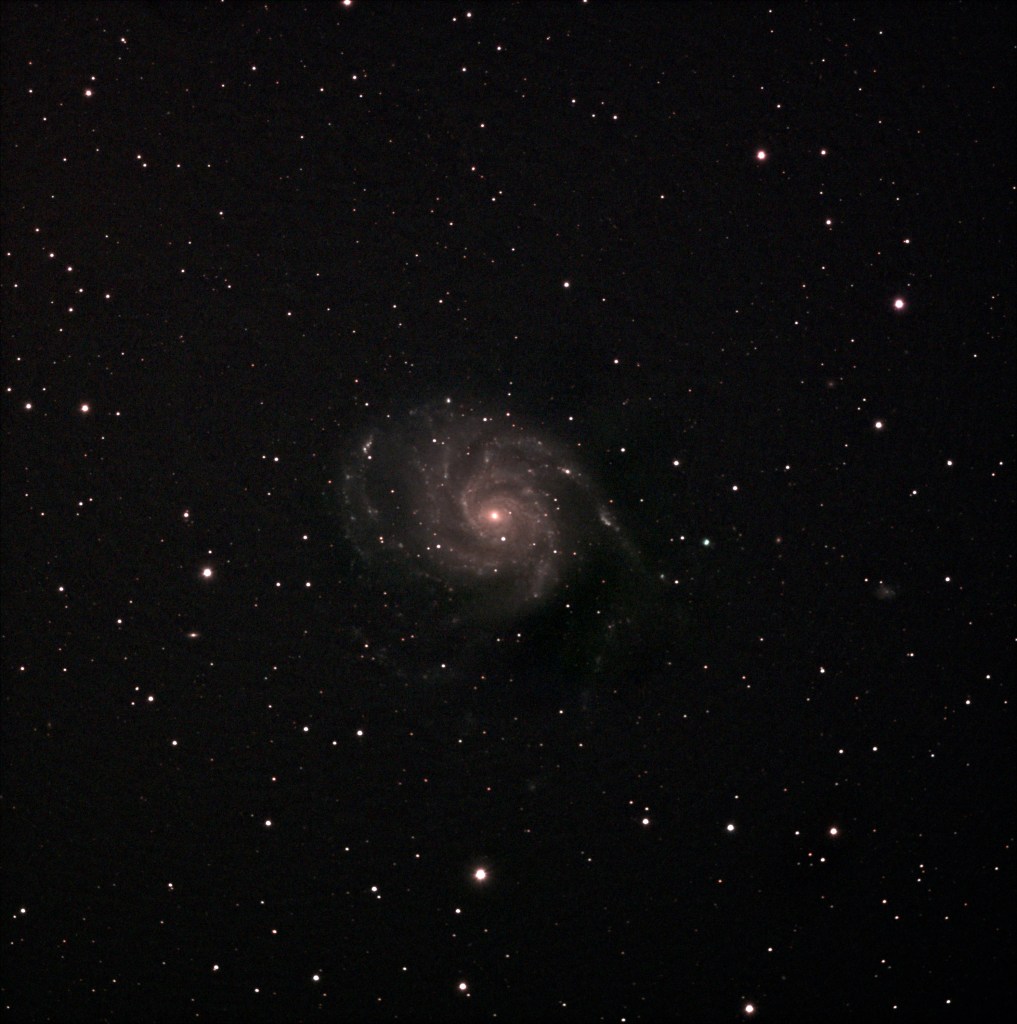
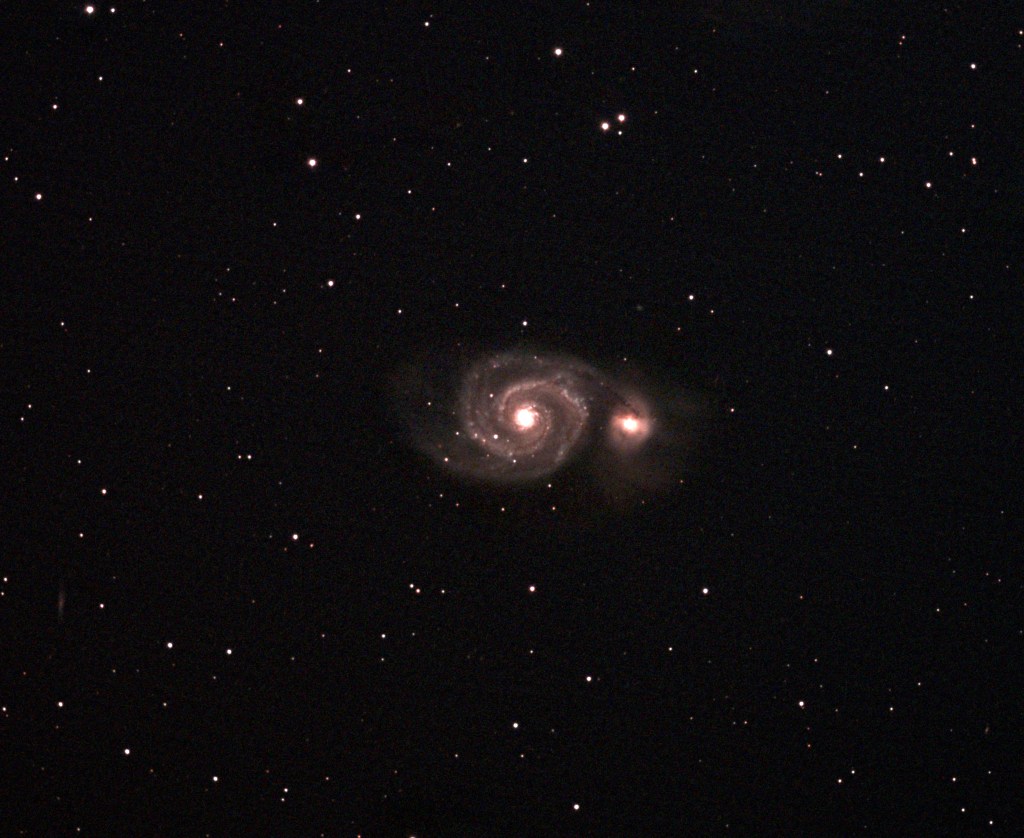
I was able to just over 3 hours of data, most for an image that I have taken so far, and the result speaks for itself:

M101 Pinwheel Galaxy 30×300 second and 11*200 second subs

There was some post processing that I had to do in GIMP to remove light pollution gradient and I think having more integration time would remove the noisiness/graininess from the image but overall I am pleased with what I was able to capture. I did include darks but not flat or bias frames. Next clear sky night I have to decide if I want to stick to this set up or test out my mirrorless with NINA. If I stick with this set up, should I get more data for the same target or go to a different one. Decisions, decisions too many decisions to make…… well, good thing is I don’t need to make any of the decisions right now 🙂 .. so let’s wait for the next clear night and punt the decisions to then.

[Edit]: One thing I forgot to mention in this post and prior post covering this issue is that the setup had worked with all my devices connected to the USB hub. Something changed between builds of Kstars/EKOS/INDI that caused the driver to break.

Astronomy: The night was a bust, well almost!

After two months, there was a clear night in the Pacific NorthWest. Naturally, I decided to set up my telescope and get some pictures. I wanted to capture some real data to process and publish so did not tinker with my setup. Since it is galaxy season right now and between the mirrorless and CCD camera, the CCD set up was tried and tested, so I decided to use it. After putting my son to sleep, at around 8pm, I set up my camera, polar aligned it and got the imaging camera in focus. Problem started when I was looking to get my guide camera in focus. The camera wasn’t taking a picture and returning this error: [ERROR] GetQHYCCDSingleFrame error (-1)

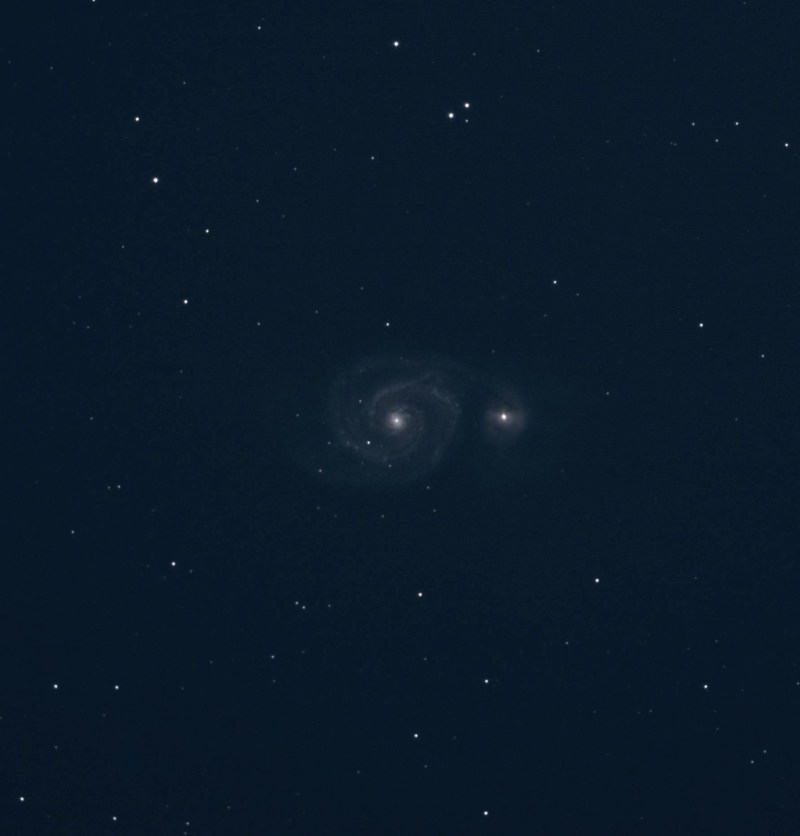
I tried rebooting my Raspberry Pi and switching the USB ports but still the same error. I had recalled that earlier i had to download the latest SDK to make my QHY camera work. I tried that as well but with no luck. At that point I decided that instead of trying to debug the issue, I would rather capture some data. Without autoguiding, I couldn’t expect to get pinpoint stars with more than 30 second exposure but that would mean I wouldn’t get any sort of details of the galaxy arms. Even so, I just wanted to be able to capture some deep sky object. The target was M51 (Whirlpool Galaxy) and plate solving (which I had a bit of trouble getting remote solver to get going) placed smack in the middle of my frame. I started shooting 30 second subs and luckily there was no trailing. I could have bumped up the sub duration but I did not want to try it then. I took around 60 subs plate solving every 10 or so subs to make sure the object was in the center of my frame. I could have continued taking more pictures but I prefer at least 3 minute subs so checked the weather for the following night – “mostly clear” and decided that I will debug the problem during the day and set up the following night and hopefully get some useful data. I took around 10 darks and called it a night around midnight. I’m still figuring out the issue with the QHY camera and will write about it in a subsequent post but for now, here is what I captured:

M51 Whirlpool Galaxy. 60 30 second subs 10 30 second darks and no auto guiding.

This is a stack of 60 30 second subs and 10 30 second darks with just some stretching and no post processing. I still have a long way to go for getting a great print worthy astrophotograph but I think the night was not a total bust. One thing astrophotography will teach you is to be patient :). I have been at it for more than a year now but don’t think I have one photography that I can call great. I have, however, learnt a whole lot in this past one year and hoping that my efforts at documenting my journey will be helpful to folks who are just taking this hobby up.

[Edit]: Here is a post processed version of the image. After the initial stretching, I tried to get rid of some light pollution. I still have a long way to go in terms of learning how to post process but for such a short integration time, I don’t think the image is half as bad. What do you think?