Skyguider Pro and Autoguiding

One of the challenges with my astrophotography set up is that its not portable. To be able to take photographs of Deep Sky Objects, I needed a set up that allows for autoguiding while still being portable enough to carry on airplanes. After a little bit of research back in 2022, I found a couple of mounts that I thought would meet my needs. Both were portable tracking mounts (tracking in RA only no DEC motor) that had capability to do autoguiding through ST4 port of the camera. Of the two (Skywatcher star adventurer and iOptron Skyguider Pro), I decided to go with iOptron mount as I had recently purchased another mount of theirs (GEM45) and was pretty satisfied with it. Ofcourse, only a month after I bought the tracking mount Sky Watcher comes out with a portable Star Adventurer GTi which has tracking both in RA and DEC making for better tracking, GoTo capability and pulse guiding through PHD. The mount was announced but was not available to be delivered until a couple of months if I recall correctly. I decided to hold on to the Skyguider Pro and make a decision at a later point if I want to trade-in the Skyguder Pro with Star Adventurer GTi. Only problem is, I never did. We were expecting out second baby so this mount was going to be used when we actually planned to make a trip which was not in the near future. The mount sat in the storage and I just sat on making the trading in decision. Now its too late to get a decent value from a brand new unused mount that is couple of years old when there are much better similar priced optinos in the market available. So I decided I will just use it and not focus on upgrading.

This past month I decided to test out the mount’s autoguiding capability now that my daughter is a year old we have been seriously thinking of starting travel (including camping). I thought testing should be quick and easy but boy was I wrong! We have had a good run of clear night skies in PNW so I set up the mount one night, polar aligned and then tried it with my camera and 70-300mm lens. I hoooked up the autoguider camera (ZWO ASI 120MMS) and guidescope (ZWO 30 f/4) and tried to autoguide with PHD2 with “on camera” as the mount option in the PHD2 setup. During calibration, PHD2 failed saying that there was little to no movement to the east. I tried looking at the cables, connections etc. to make sure if everything was connected right and there were no loose cables. Nope. Everything was connected fine. After fiddling with the equipment for an hour, I decided to give up. Assuming it might have been a faulty cable, I tried to set up the following night again but with different sets of cables. I switched to a ZWO ST4 cable and a different USB from camera to the laptop but no joy. After the second frustrating night, I decided to trouble shoot during the day time and not waste any of the clear nights trying to debug the issue. I used my regular telescope setup to actually gather photons from Deep Sky Objects for the next couple of nights.

To debug, I tried manual guiding by pointing the guide camera to a tiny stationary object during day time but the mount did not budge. With no other ideas on what could be wrong outside of either the wire or the ST4 port on the autogider or mount being broken, I reached out to iOptron for help. After a couple of back and forth emails, I learnt that it could be the ports are wired differently for the camera and the mount. When I looked up the pinouts for the camera and the mount, it was indeed different, although only the RA (left and right) pins were flipped. See below:

Skyguider Pro Guide Port Pinout: Source: https://www.ioptron.com/v/Manuals/3550_SkyGuiderPro_Manual.pdf
Camera Guider Port: Source: https://i.zwoastro.com/zwo-website/manuals/ZWO_ASI_Cameras_Software_Manual_EN(Windows).pdf

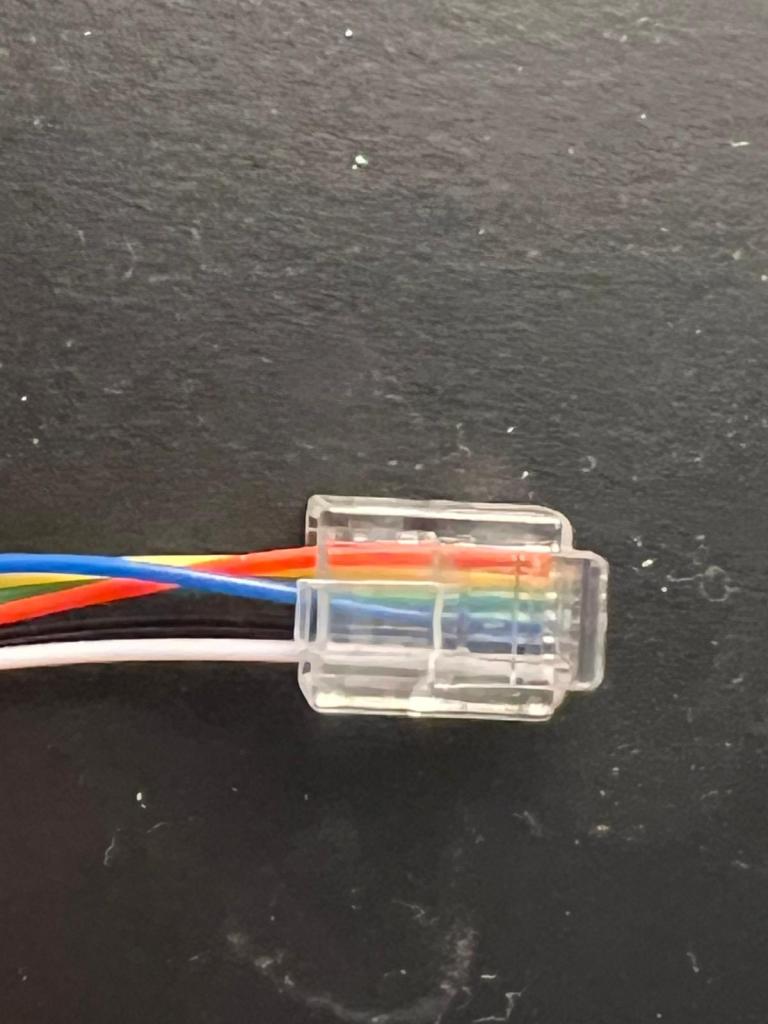
To test if this was the issue, I stripped the RJ11/12 wire flipped the 3rd and 6th and crimped a new RJ11/12 socket. I tested it out using the manual guiding method during the day time and was excited to see the mount move. At night, after the kids went to bed, I set up the mount again and launched autoguiding through PHD2. Calibration succeeded on first try and the mount was being autoguided by the camera. To see if I could get long exposures, I tried several 5 minute subs at 300mm and saw no star trails at all. Exciting times!. I now need to try the 600mm lens and test 5 minute exposures but for all practical purposes my “travel” set up is now ready to go. All we need to do is make some trips to places with lower light pollution to actually use my travel set up to get some DSOs.

Here is the image of the DIY ST4 cable:
Astronomy: Astrophotography Cable Management

I had been meaning to post this for ever. I had, what I thought pretty good arrangement for cable management with my SkyViewPro mount and the ES 102mm. There were only 2 wires going from the mount/telescope down to the battery pack/power supply (technically power supply and router as I was connecting a lan wire to my rasbperry pi). However, with my mount kinda dying and me investing (hehe 🙂 ) in a new one, this setup is not very useful for me anymore. I still thought I should post this for anyone interested in a DIY solution to make cable management easier. I did two iterations of my set up, the second one being much more compact than the first one. Either works. It’s all up to one’s apetite for DIY. I was hoping to do a YouTube video on this as well but never got around to it and now I have dismantled this set up owing to my new mount purchase (details in a later post). This solution may be an overkill for someone who is willing to shell out a few hundered bucks for s device such as ZWO ASI air or ASI Air pro but I like to tinker with things so I built myself a cheap solution. Like I said, I don’t have a video on it so for now pictures and a narrative is all I have. However, I promised a friend of mine that I will build him a similar solution so I’ll plan to record that session and upload it to the interweb.

There are three main components to making cable management easier. All these components need to be placed on the telescope so the smaller the footprint the better it is. My telescope is not that heavy so mounting three different not so compact items did not add too much weight. I used velcro to make sure they stayed on the scope. Anyway, I digress. The components are:

  1. A computer to control the cameras, mount, guidescope, filterwheel, focuser etc. In my case, I used Raspberry pi running astroberry software
  2. A USB hub to run the various devices. Onboard USB ports on Rasbperry Pi are inadequate because of the limite current those devices can draw
  3. A power hub to supply appropriate power to the devices.
  4. 12v to 5v stepdown module

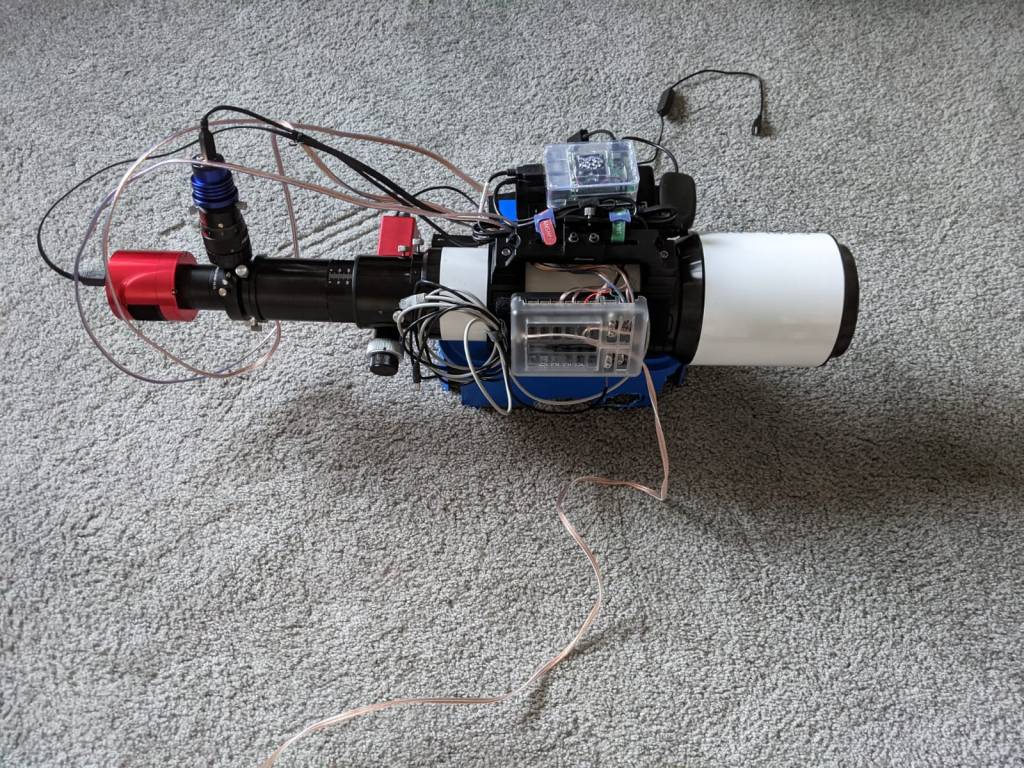
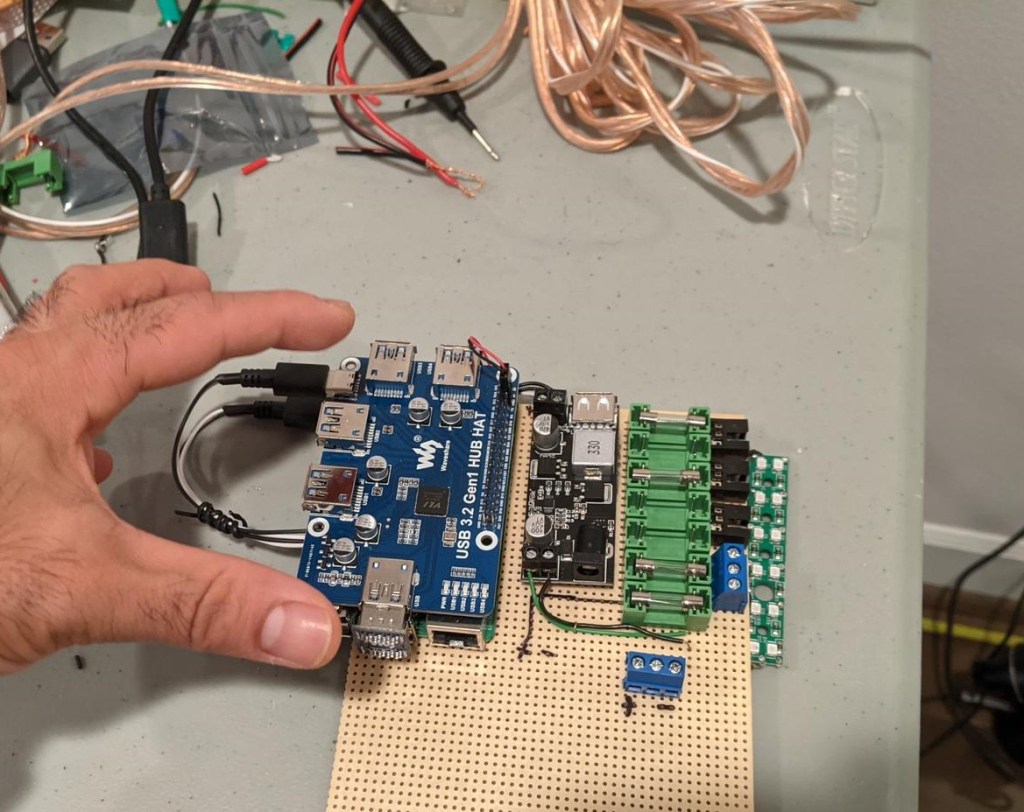
Well, its technically 4 components even though I said three main because the stepdown module doesn’t have a very large footprint :). This setup has served me very well and I would have continued using it with refinements over time, if not for a change in my mount that has pretty good features for cable management. The below image is a top view of all the connections. Not sure if you can tell but there is a rasbperry pi on the left and underneath which is a 7port USB3 hub. On the right is a power hub with 12 outs (a typical fuseblock used in automotives). In hindsight, 12 outs might have been an overkill 🙂 . I just needed 6 which ould have still left a couple open for future enhancements (filterwheel) and a couple of dew heaters. In anycase, with the 12 out fuseblock, the weight on the left was being compensated well on the right side so I let it be. While I would, in the future, need an output port for a dew heater, I currently use a cheapo USB one that I had purchased before I built my own DIY dew heater. When I purchased it, I was worried that it wont have enough power output but it works fine for the scope that I have. So I currently use it just for this scope. I dont need to add another output and the 7port USB hub powers it fine.

Everything connected to the scope with 2 wires going to the mount and one out to the 12v supply

Here is a view with everything connected and you can see the USB and power for the mount folded near the focuser next to the fuse block. I haven’t used the handcontroller in over a year now. I just use the EQ mod cable with a connection directly from the rasberry pi to the mount. It works great!

All the wires connected

The above set up with Astroberry software works just great except for the focus module. I never seem to have gotten it to work. Others have, so I just need to tinker with it a bit. However, as I think I mentioned in one of my earlier post, I always try to spend as much time imaging on clear nights as possible so have been using a Bahtinov mask. It’s probably time to figure out the focus module to get truly remote set up – from my driveway 🙂 .

I was in the process of upgrading the above to a very small footprint setup (think ASI air size 🙂 ) but then my mount died and I purchased a new one so that set up is kinda not useful anymore. I am thinking I will leverage that for my friend to use. Here is how the – in progress – setup looks like:

It has 7 power ports and can be enclosed in a small DIY project box once complete. Like I said, I will try to document the process over view and share when done. Till then … Take care!

Astronomy: End of an era

Early last month, I bid goodbye to my trusty old mount. I had bought that mount about 12 years ago without knowing much about astronomy or astrophotography. All I had was a keen interest and after reading some reviews on Amazon, I went ahead and purchased an Orion 8″ Newtonian and a SkyView Pro (SVP) mount. I For the first 10 years, I used the mount and telescope sparingly for various reasons. As I mentioned in my earlier blogs, starting last year, I have been spending much more time on astrophotography. With a new lighter telescope, I was able to use the existing mount and get pretty good autoguiding for long exposure photography. I had experimented with 10 minute exposures and got pretty nice round stars. I was pretty happy with the combination and would use to look forward to clear nights for setting up my telescope to take pictures. I have dealt with several challenges in my astrophotography journey which I have been documenting in my blog. Those challenges ranged from light pollution to plate solving to focus but hardly ever on auto guiding. All this changed a couple of months ago. No matter how accurate my polar alignment or the balance of my mount, I was not successful in getting autoguiding to work. In fact, over my last few outings, I wasn’t even able to suffcessfuly calibrate the mount to begin autoguiding. In addition, I had noticed that mount wasn’t moving freely when the RA and Dec bolts were disengaged. I did what I usually do.. trusty ole Google 🙂 . After a bit of research I found a couple of posts talking about degreasing the mount for cases where the mount doesn’t move as freely when the RA/DEC locks are disengaged. This usually seeemed to solve the problem for cases when case calibration fails even with accurate polar alignment and well balanced mount.

Given my mount was more than a decade old and was having trouble moving frictionlessly, I decided to put my shoddy DIY skills to use and degrease/regrease the mount. I looked up but did not find any videos on the process of doing that for my specific mount. I’m not someone who backs away from a challenge so I decided I will go ahead without instructions (in reality, my mount was End of Life anyway, so I did not see a huge risk to opening up the mount). I tried to document my journey through a video but not sure how much I captured given that I was so engrossed in oepening up my mount that I did not pay attention to how much was actually captured (and if it was captured well). I tried. I will post my learnings in a new blog post with a YouTube video in case it might help someone. Too lazy to do all the editing needed to get it out there. Anyway, I was able to open up the mount alright – Although there is a big warning for any DIY’ers planning to open up their SVP mount! I almost broke my mount trying to open it up. Orion did some sneaky stuff with the number of screws in RA vs. DEC axes. More on it in the video but suffice to say I almost ruined my mount. Well, the mount was ruined for other reasons that will bcome apparent momentarily but if not for that, i would have ruined a nice mount because of the snafu I made.

Anyway, the reason I called this blog post end of an era is this:

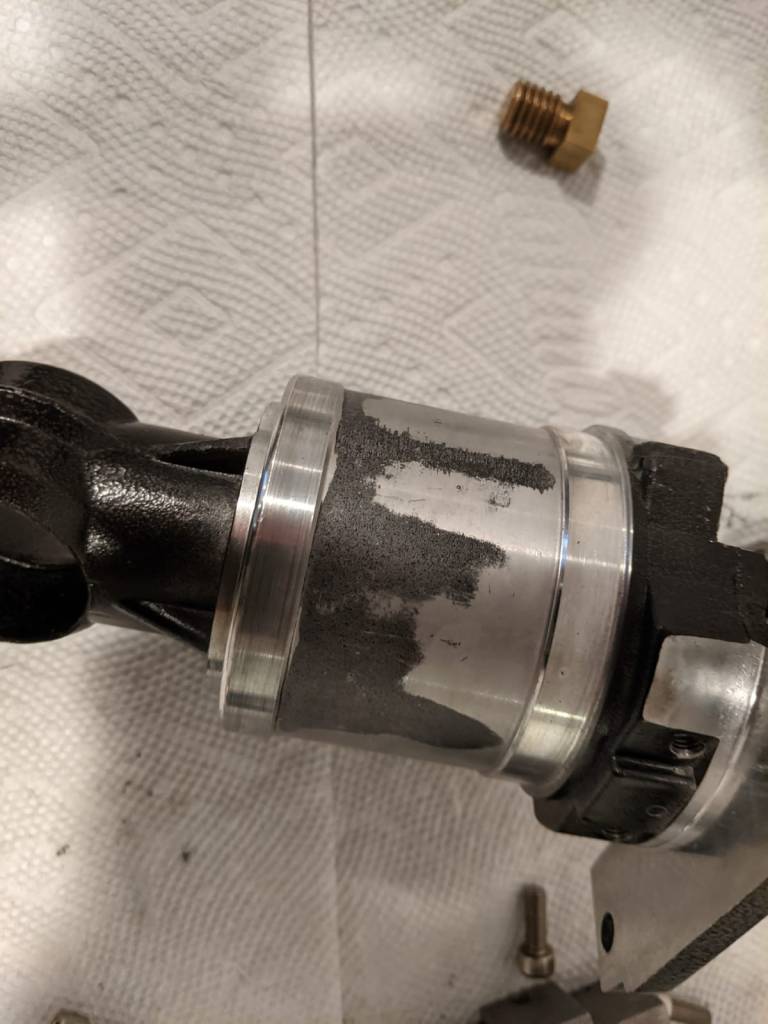
Major reason why autoguiding on SkyViewPro mount was failing

My trusty old mount had significant abrasions which were causing the friction in the mount preventing it from moving freely! That’s 12 years of wear and tear right there. My handling of the mount was very rough and it had fallen off my hands once. I still had some hope and put a bunch of grease and put the mount together. I tried taking it out on a clear night. I seemed to be tracking well but calibration was failing over and over again 😦 . At that point, I decided that it was time for me to retire this mount (although, I think I can still use it for wide angle unguided photography), and invest in a new one for Deep Sky Imaging. What surprised me was that I was able to take unguided 180 second images which showed very little to no signs of trailing.This is an eight 180 second image stack of fish head nebula (with some basic stretching):

Fish Head Nebula no autoguiding 180 sec*8 images stacked and stretched

Anyway, 180 second is no good if I want to image faint objects with filters applied. More on that in a later post but I did make a decision and invest in filter as opposed to going monochrome with filterwheel etc. It made more sense in light of the investment (well I call it an investment to justify it but its just an expense 🙂 ) I made for a new mount. More on that in another post as well. Hoping to spending more time updating the blog but not many hours in the day to do it… hopefully soon. Until then adios!

Astronomy: When cheap LPF solutions aren’t enough

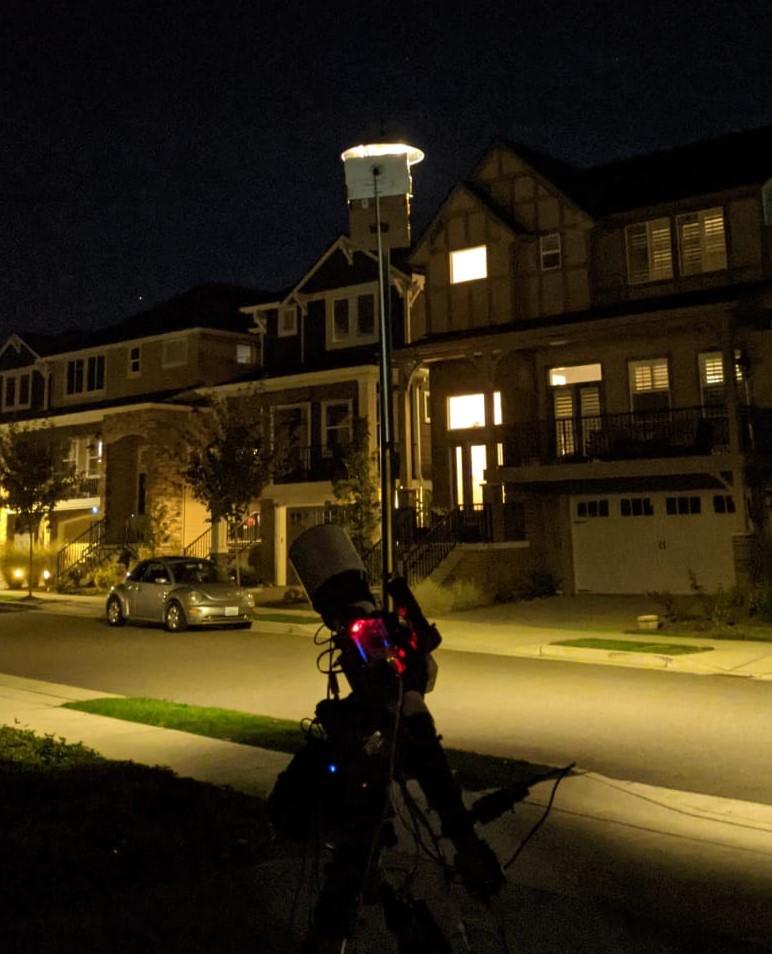
For a little over a year I have been doing astrophotography from my drive way, I have talked about how there is a lamp post right in front of my house creating challenges in photographing North Eastern Sky. I have, over time, employed crude techniques to limit the light intrusion from that lamp post including a crude cardboard placed on the OTA. Last night I was trying to image the fishhead nebula (IC 1795). It is visible on the north eastern part of the sky and I have been avoiding objects on that side because of the aformentioned reason. However, last night I had a plan! Well, what I thought was a fool proof plan. To block out the light pollution from the lamp post, here is what I did:

A relatively inexpensive solution that actually did a pretty goood job blocking the light from the lamp post. It’s a bit short and doesn’t cover the entire lamp but that I can fix for next time around. It has now become a part of my setup! However, the night was still mostly a bust for two reasons:

  1. Full Moon
  2. Autoguiding

I had accounted for the fact that it was a full moon night and hence deliberately chose a target (away from moon) but the second issue forced me to choose another target. Given that the nebula is faint, I wanted to capture as much data as possible which meant atleast 180 sec, if not 300 sec light frames. Unfortunately, autoguiding was failing due to mount backlash issues. From my prior googling, I know that the mount needs to be balanced and not over capacity. I ensured that th mount was balanced before I started. I need to try next time with one less counter weight placed at the end to see if two counter weights are taking mount over capacity. Anyway, because of spectacular failure in autoguiding, I had to resort to unguided images which meant easier targets. I slewed to triangulum galaxy as I thought it would be okay to get 100 sec or less unguided exposures. While I did achieve good round stars and no star trailing (surprised as autoguiding was failing but this worked 😐 ), there was a glow from the moon that washed up the images. I could not go longer exposures for the fear of getting even more glow from the moon. Unfortunately, that meant no salvagable data from the night and a key learning – there is more astrophotography related spending in my near future 🙂 .

I need to decide what the next steps are. First, I think i need to try out another night to see if guiding issues still persist. If so, it might be time to retire the mount. It’s been with me since 2012 and has fallen from my hand more than once. More on my thoughts on that later. Second, I need to decide between continuing with OSC (one shot color) photography from my driveway, knowing that the lamp post light pollution is potentially solved but moonlight is not, or go with RGB with a monochrome camera. The advantage of OSC is that I get the entire color spectrum data at once. Given that I have limited window each night to work with, I can try to wrap up a target in a couple of nights. However, OSC also means I am limited to nights when the moon isn’t a problem or I have to invest in a LP filter or a nebula boost filter that can block moon light as well. Its a couple hundered bucks and I’m set. I do need to research what filter to buy though 🙂 . Monochrome photography means a whole lot of expenses – Monochrome camera, filterwheel, filters. While it might clearly seem that the scale is tipped towards OSC from cost perspective, monochrome *may* be the way to go if I consider long term where I will invest for my potential (hopefully) future observatory. So … A lot of contemplation, deliberation and reflection lies ahead. Will come back and share my decision and the rationale in the next post. Stay tuned!

Personal: What a day!

Couple of weeks ago, I had a pretty interesting 24 hours. Before getting into it, here is some background: Last year I bought into an LLC that affords it members a dark sky site and a piece of land to pursue astronomy. I will get into the details of that exciting part in a later blog. Suffice it to say that I am a member of Goldendale Sky Village (GSV) and I’m in the process of (hopefully) building a remote observatory. I had hired a contractor to install a concrete pier towards that goal. Goldendale sky village is a LLC formed by like minded astronomy enthusiasts who purchased a piece of land in Eastern Washington to pursue their hobby. I too enthusiastically bought into the venture and have 5000 sqft of land for my personal use. I don’t own the land but can use it in any way I like for my hobby.

Last year, I got the plot cleared and this year was working on getting a pier installed. It is towards this goal that I had to drive there. I had built a template and secured J-bolts to attach to the pier. The plan was to go there in the middle of the night and early AM the contractor would pour concrete (about 30 minutes worth of effort). My presence was there to ensure that the J-bolts and pier plate template are level and aligned to the celestial north. I wouldn’t need to worry about it if i was getting a custom plate machined for my mount and the J-bolts but I wanted to have the option of using Dan’s Pier top plates. These are custom built pier top plates with adapters to switch out and replace for any mount type. Having these would make my pier (and potentially future observatory) mount and future proof. Those plates are a bit expensive and they have a long lead time. I could not order them in time to use directly for concrete pouring. So I built the template, with the hopes that in case my pier top is not aligned to the north or my template was off, I could still use custom machined plates. My neighbor at GSV kindly offered to machine one for me in case I need to go that route.

Any way, I digress. My plan was to reach GSV before sunrise to make sure I got the polar alignment marked out and hope was to leave GSV around 7:30 am so that I could reach home around 10 and be able to get to work. I left from home at 2:00 am to reach GSV just before sunrise. I also had a doctor appointment in the afternoon which I thought I could comfortable make it to. Well, hehe 🙂 . After getting the concrete poured, I left for home hurriedly. Half hour on the road from GSV, I got engine temperature hot warning. The indicator was yellow, meaning I could still drive but cautiously. Within a couple of minutes it turned red and there was smoke from the front of my car!!! I had to stop on the side of the road, wait for a while for engine to cool down and check whats going on. To my surprise, there was hardly any coolant! I did not have AAA with this car as we hardly use it after our son was born. Its a 2010 mini cooper so no place to put a car seat 😐 . To top it all off, I was in an area with no cellphone coverage. I knew that I won’t have cellphone coverage for another 30 miles. So after waiting for a while for the engine to cool down, I decided the only option was to drive to an area of cellphone coverage and get a tow vehicle. Oh, did I mention that I dropped my cellphone on gravel early in the am? It was causing the screen to flicker wildly making it unusable after 30 sec to 1 minute of activity … Calling the tow companies would be fun. It was for the same reason that I couldn’t call to cancel or reschedule my dr. appointment (the timing of these appointments is critical for my FAA medical certificate – I can write another blog about those stories 🙂 ). But first things first, I had to get to cellphone coverage area.

So the next 30 miles took me close to 2 hours as the car was getting hot if my speed went over 20 miles an hour. It was annoying the hell out of other drivers on a singe lane highway. I tried to drive as close to the shoulder as possible with my hazard lights on so that they could overtake me but, you know, there are some drivers who just get pissed off no matter what ¯\_(ツ)_/¯. Anyway, after driving for what felt like hours, just as I got to an area with cellphone coverage (that was the first life saving moment of the day), the car wouldn’t start. The day was getting hotter too so the engine wasn’t cooling enough. With my broken cellphone, I couldn’t browse the web to be able to find towing companies in the vicinity so I called my wife, explained my situation and had her call the towing companies. No one was available. She called 4 of them and all had one excuse or the other and could not be bothered to help out. I was just 5 miles from the town center!

Assuming that no one was ready to help out, I thought my best bet was to abandon the car, walk the 5 miles to town and talk to one of the towing companies. If that did not work, either stay the night in a motel or see if any of my friends could come pick me up. I was talking to my wife discussing what to do and how to go about things when she asked if there is anyone from GSV that could help me out. I’m like ofcourse, I should have thought of that!!! One of my fellow villagers also had concrete poured in the morning and he was gracious enough to let me go first because I had to go to the dr. appointment. Welll so much for that 🙂 . Anyway, I did not have his contact information but we are all a part of a slack group. I called him on slack right away! This was my second life saving moment of the day. He not only picked up but was about to leave from GSV back to Seattle area after finishing up his lunch. I asked if he could pick me up and he kindly offered to do so. Since I was fully vaccinated and he too was, it was not a concern to sit in close proximity with each other. I would have worn a mask if he insisted or if he wasn’t vaccinated but since we were both vaccinated, it did not come to that.

After about an hour, his car pulled up behind mine, I just picked all the valuable stuff from the car and hopped on to his. After an uneventful journey where we talked at length about our life and background and interest in astronomy, I reached home at around 4:30pm. He also gave me tips, suggestions and pointers on what kind of a mount to go for as I am in the market for a new mount (more about that in a subsequent blog). I owe him a big one for being the life saver on that day! I was up from 1:00 am the previous night and survived only on a protien shake, cashew cookie bar. So first thing I did after getting home was had breakfast+lunch+dinner combined then a nice hot shower. I was totally exhausted but stayed up till late evening so as to not got to bed at an odd hour.

It was a very long, very tiring and an eventful day. One that I’m sure I will reminisce at a later point in time! Oh btw, I did call the state troopers in Yakima county to let them know that I had left my (my wife’s) car on the highway and plan to pick it up in the next day or two. I owe another friend a huge one for helping me with it and spending money on an accessory that he did not immediately need. I will try to cover that adventure (well, it wasn’t an adventure as such but an experience) in the next blog. Until then, stay safe!